New Rate Limits for Aqueduct: More Room for Bursts, a Cap on Marathons
Since Monday, 9 November 2026, Aqueduct has new rate limits. You can now send twice as many requests per minute as before, and there is a new hourly and daily limit on top. We did not pick these numbers out of thin air: we went through a week of Aqueduct's request log first. This post shows what we found and what the new limits mean for your work.
What changed
Until 8 November, every API key had a single limit: 25 requests per minute, and nothing else. Now there are three:
| Per minute | Per hour | Per day | |
|---|---|---|---|
| Before | 25 | no limit (1,500 possible) | no limit (36,000 possible) |
| Now | 50 | 1,500 | 15,000 |
The hourly limit is 30 minutes' worth of the per-minute limit, and the daily limit 300 minutes' worth. In practice:
- Bursts get twice the room. A coding agent that fires off a quick series of requests is far less likely to be
refused with a
429. - No hour gets less than before. 25 requests a minute for a full hour was 1,500 requests, which is exactly the new hourly limit.
- The day has an end. At most 15,000 requests a day, which is ten hours at the old full speed.
- Model multipliers still apply. A request to a model with
2x Limits, such asqwen-3.8-27b, counts as half a request against all three limits.
Each API key has its own limits. The minute and hour limits reset on the full minute and hour, the daily limit at
midnight UTC (01:00 in Vienna in winter, 02:00 in summer). When you hit one, Aqueduct answers with 429 and a
Retry-After header that tells your client how long to wait. The details are in the
FAQ.
One week of Aqueduct
We analysed Aqueduct's request log from 15 to 22 October 2026. The log records when a request was sent, to which model and how many tokens it used, but not what it said. Accounts were pseudonymised for the analysis, and no account is named below. In that week, 222 accounts (individual users and service accounts) sent 645,312 model requests (chat, completions, responses, embeddings, speech and images) with 35.5 billion input tokens and 726 million output tokens.
A few accounts send most of the requests
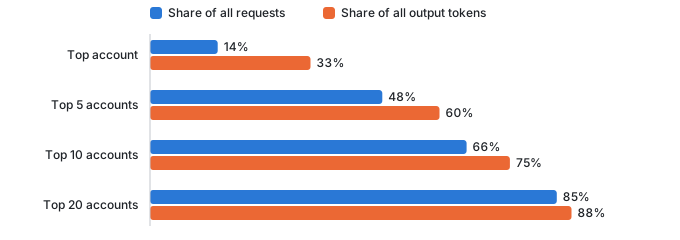
Usage is very uneven. The five busiest accounts sent almost half of all requests, and the twenty busiest 85%. Most of them run scripts through an SDK or let coding agents work unattended. Chatting is a small part of it.
People work office hours, scripts work through the night
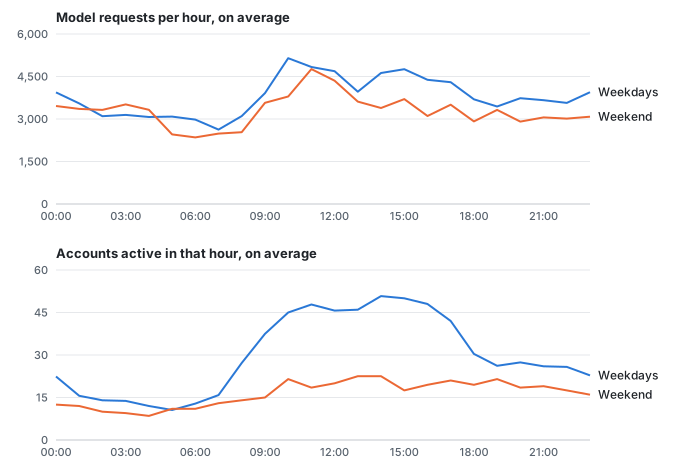
On weekdays, 45 to 50 accounts were active in each hour between 10:00 and 17:00, and only 10 to 16 at night. The number of requests changed much less: at night there were still around 3,000 requests an hour, sent by about a dozen accounts. Of the requests from the ten busiest accounts, only 26% fell within office hours. For everyone else it was 61%.

A typical account never comes close
For every account, we looked at its busiest 60 seconds, its busiest hour and its busiest 24 hours of the week. At its busiest, the typical (median) account sent 12 requests in a minute, 70 in an hour and 127 in a day. That is a quarter of the new per-minute limit, and less than 5% and 1% of the hourly and daily limits.


Only a few accounts reached the new limits: 12 in their busiest minute, 4 in their busiest hour and 5 on their
busiest day. Some accounts show more than 25 requests a minute although the old limit was in place. That is because
the chart counts all keys of an account together, over any 60 seconds, and includes models with 2x Limits. The limit
counts each key and each calendar minute on its own.
We also replayed the week against candidate limits, to see how many requests each would have refused:
| Limit on its own | Accounts hit | Requests refused |
|---|---|---|
| 30 per minute | 22 | 3.7% |
| 60 per minute | 6 | 0.5% |
| 1,000 per hour | 9 | 4.7% |
| 1,500 per hour | 4 | 2.7% |
| 10,000 per day | 7 | 14.2% |
| 15,000 per day | 5 | 2.9% |
The replay assumes that clients keep sending exactly as they did, so it is an upper bound: real clients wait and try again. Tighter limits of 30 a minute, 1,000 an hour and 10,000 a day would have refused 16% of all requests, from 25 accounts, and would have started to hit coding agents during normal working hours. That is not what we want.
What the limits mean in practice
The chart below follows a script at full speed through one day, before and now, next to a busy day of a coding agent.


A coding agent at work. Agents send requests in bursts while they work. In the minutes in which an account was active, it sent 4 requests at the median and 31 at the 99th percentile. 50 a minute leaves room for that. Even a busy coding day (the 90th percentile in our week) adds up to 1,757 requests, about 12% of the daily limit.
A script at full speed. A script that sends 50 requests a minute reaches the hourly limit of 1,500 after 30 minutes and waits for the next full hour. After ten hours it has used its 15,000 requests for the day. Under the old limit, the same script could send 25 a minute around the clock, 36,000 requests a day.
A large or long-running job. If you need to process a lot of data, please ask us for a service account. Service accounts have higher limits, and we can schedule large jobs so they don't take capacity away from everyone else.
Whatever you run, make sure your client honours 429 responses and the Retry-After header and does not retry
straight away.
What request limits can't see
A request is not a fixed amount of work. The typical request in our week sent 50,448 tokens and got 375 back. Coding agents and scripts send the whole conversation or file context with every turn, so prompts of 64,000 tokens or more make up 44% of the requests but carry 85% of all input tokens.


Two cases from the week show what counting requests misses:
- A client stuck in a loop sent a large number of requests to a model that no longer exists, and every one of them was rejected. It sent them at a steady pace all day, slowly enough to stay under all three new limits.
- A single generation job wrote a large share of the week's output tokens while sending fewer than 50 requests a minute, mostly at night.
Request limits are a guard rail against floods and runaway clients. They do not share the GPUs fairly between users. That is the next thing we are working on: limits that only apply when a model is actually busy.
Tell us how it goes
We will keep watching the numbers and adjust the limits as usage changes. If you run into them during normal work, or if something here does not match your experience, let us know in the Matrix room.