Aqueduct
TL;DR
Aqueduct is a platform to provide access to LLMs and related services via an API for all researchers, lecturers and university staff for any purpose in a simple and straightforward manner.
- Chat/Support: Matrix Channel
- Cookbook: Usage Examples
- Monitoring: Dashboard
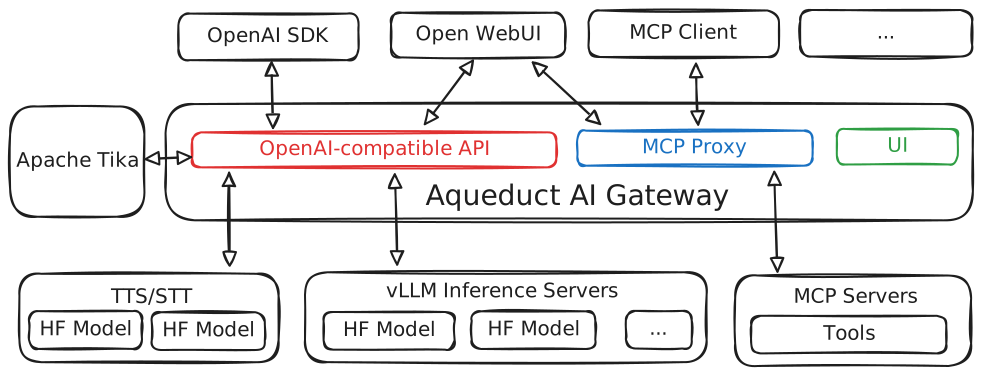
We host several Large Language Models (LLMs) that are freely available for anyone to use. Our APIs are fully compatible with the OpenAI API, allowing seamless integration using the standard OpenAI client library with our API base URL. Aqueduct aims to be a feature rich and stable foundation to build services on top of while implementing new features in an ever-evolving AI landscape.
Tip
For comprehensive API usage guides and a feature overview, see the public Aqueduct documentation.
Contribute to Aqueduct AI Gateway on GitHub!
Architecture Overview
Authentication
To authenticate with the API, you need an API key. To obtain your API key, you can access the Aqueduct AI Gateway UI here: https://aqueduct.ai.datalab.tuwien.ac.at/. You can log in via TU Wien SSO. Then you can generate your personal API key.
Available Models
The currently available models are:
deepseek-v4-flash-284b-- Hugging Face Link- context length of 393,216 tokens
- original model, no extra quantization applied
- runs on NVIDIA H200s
- supports
highandmaxreasoning efforts - does not support image inputs
qwen-3.6-35b-- Hugging Face Link- context length of 262,144 tokens
- 4 instances, each running on 1x NVIDIA A40
qwen-3.5-397b-- Hugging Face Link- context length of 200,000 tokens
- 2 instances, each running on 4x NVIDIA RTX PRO 6000 Blackwell
glm-5.2-744b-preview-- Hugging Face Link- context length of 262,144 tokens
- 1 instance, running on 8x AMD Instinct MI300X
Text-to-speech (TTS) Models
We offer TTS models through an OpenAI-compatible API. For a usage guide please see the Aqueduct public documantation. The currently available models are:
kokoro→ Hugging Face Link- Language: English
- example output: https://huggingface.co/hexgrad/Kokoro-82M/resolve/main/samples/HEARME.wav
- best model for English (#1 on TTS Arena)
- Available Voices: https://huggingface.co/hexgrad/Kokoro-82M/blob/main/VOICES.md
piper-throsten→ Hugging Face Link- Language: German
- example output: https://rhasspy.github.io/piper-samples/samples/de/de_DE/thorsten/high/speaker_0.mp3
- highest quality model for German in the Piper family
- Available Voices: thorsten
Speech-to-text (STT) Models
We offer STT models through an OpenAI-compatible API. For a usage guide please see the Aqueduct public documantation. The currently available models are:
whisper-large→ Hugging Face Link- Supports 99 languages (including English and German)
To list all currently available models you can run (optionally with jq to parse the JSON output):
curl https://aqueduct.ai.datalab.tuwien.ac.at/v1/models -H "Authorization: Bearer $AQUEDUCT_API_KEY" | jq
Image Generation
We offer image generation through the OpenAI-compatible API. For a usage guide please see the Aqueduct public documentation. The currently available models are:
z-image-turbo-> Hugging Face Link
API Endpoint Format
The base URL of the OpenAI-compatible endpoint is: https://aqueduct.ai.datalab.tuwien.ac.at/v1
The base URL of the MCP Servers is https://aqueduct.ai.datalab.tuwien.ac.at/mcp-servers/{name}/mcp, where {name} is the name of the MCP server.
Python Usage Example
You can use the OpenAI Python client library to interact with our API. Below is a sample code snippet demonstrating how to generate chat completions:
import os
from openai import OpenAI

model = 'mistral-small-24b'

client = OpenAI(
    base_url="https://aqueduct.ai.datalab.tuwien.ac.at/v1",
    api_key=os.environ.get("AQUEDUCT_API_KEY"),
)

chat_completion = client.chat.completions.create(
    messages=[
        {
            "role": "user",
            "content": "Say this is a test",
        }
    ],
    model=model)

print(chat_completion.choices[0].message.content)
To use a different model, simply replace the model in the OpenAI API call.
FAQ
How do I disable thinking for models?
See the vLLM reasoning outputs documentation for request-level overrides.